Lesson
ReadyGenerative AI is changing how we work. Many of us are working faster, tackling more complex problems, or improving the quality and security of our products.
But as agents take over more and more of the work we’ve been doing for years, some of us are questioning the future of programming. We may worry about whether our jobs will even exist in the next few months. At some point, this shift takes away the satisfaction, sense of purpose, and even the joy we get from our work.
MEGA.dev is a story about all of this. And I’m inviting you to join us in the next 4 weeks to learn about generative AI. Together with Theo, Angie, Kent and John, we’ll look at what it means to be a MEGA Developer and how to become one.
Outline
- Introduction: generative AI, harnesses, configuration, agentic tooling, custom tools
- Mechanics: instructions, completion, tokenization, prediction, attention, instruction following
- Limitations: illusions, confabulation, base knowledge, knowledge cutoff, context windows, output limits
- Providers: models, capabilities, features, settings, pricing, specialization, model mixing
- Interactions: text generation, structured outputs, function calling, native tools, external tools
- Steering: generalization, associations, self-querying, latent space, J-space, reasoning
Things worth knowing about LLMs
Working with Large Language Models (LLMs) is easy: all we need to do is send a message. But if we look closer, we’ll find there are things we can do to get better results, and that this can be pushed far beyond direct interaction. On the internet, we can find setups, tools and workflows, but often they have to be adjusted to our projects and our preferences. Then it’s useful to have a general understanding of what’s going on under the hood.
Large language models are typically neural networks trained on large amounts of text to generate content by predicting what comes next. We can think of them as functions that take an input (a prompt) and return an output (a completion). But today, models such as GPT-6 are more like systems that can process multimodal input, generate multimodal output and “reason” about what they do.
The LLMs we work with are often available through platforms and tools such as ChatGPT, Cursor, Claude Code, or Gemini, but we can also interact with them through an API. No matter which model or tools we use, certain traits and mechanisms are present, even if they aren’t visible to the user.
Below we have an overview of the most important things we need to get a brief understanding of before moving further.
Tokenization: LLMs work with numbers, so any data we want to process has to be encoded as numbers and then decoded back. This led to the idea of tokenizers, which assign identifiers to chunks of text. The chunks are chosen through a process that optimizes both the number of chunks in a dictionary and their size. That’s all you need to know for now, but if you’re interested, Let’s build the GPT Tokenizer is one of the best resources on the topic.
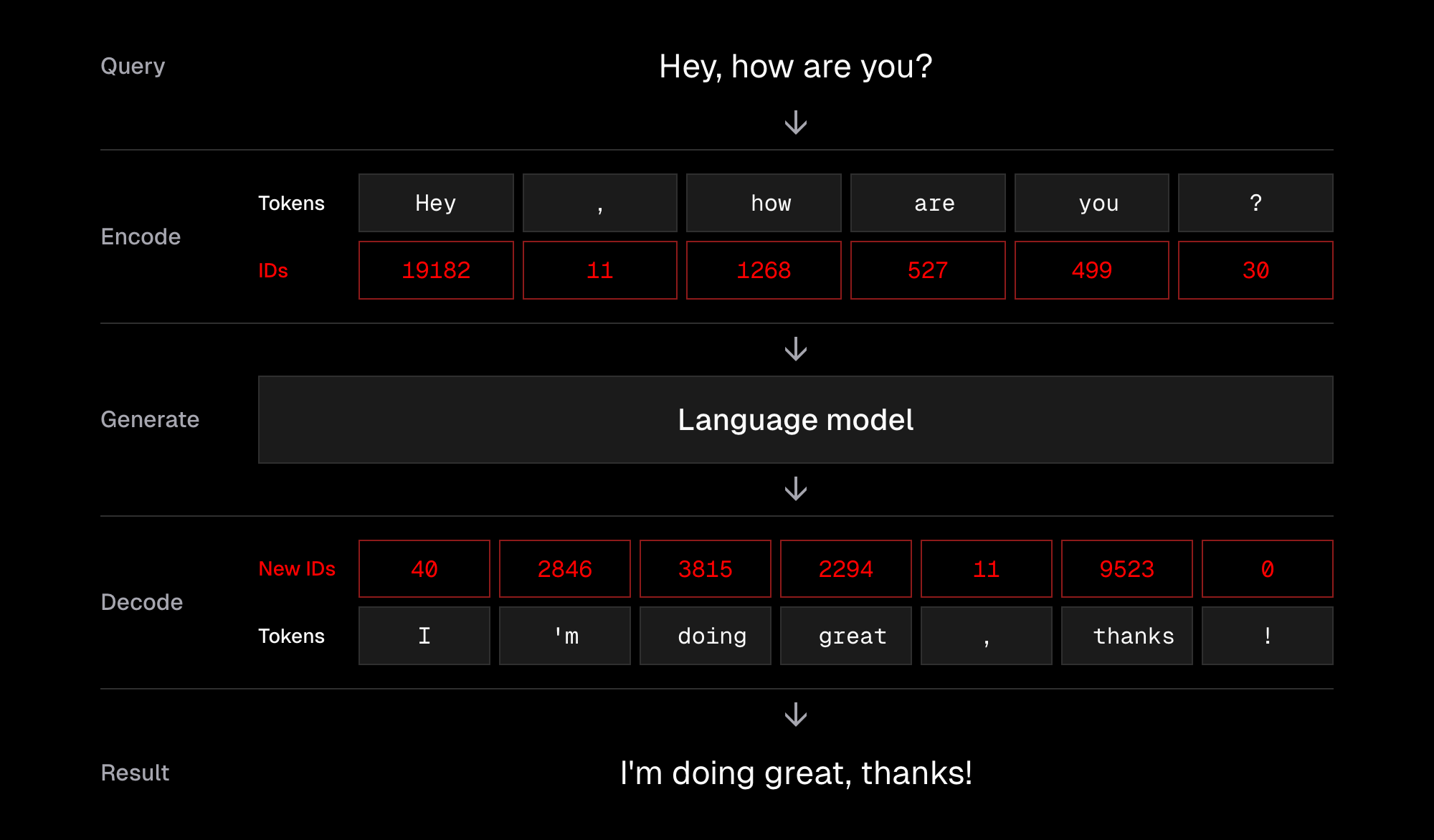
Predicting the Next Token: An LLM generates content token by token, “predicting” what comes next based on what came before. It repeats this process until it selects a special “end token”. The tricky part is that no one can tell exactly what the output will be or why it selects particular tokens. Also, once a token is chosen, there’s no way to remove it, so one poor decision may negatively affect subsequent tokens, and that effect adds up. But we know a lot about the mechanics behind it, and What Is ChatGPT Doing … and Why Does It Work? is an older but still accurate write-up on the topic.

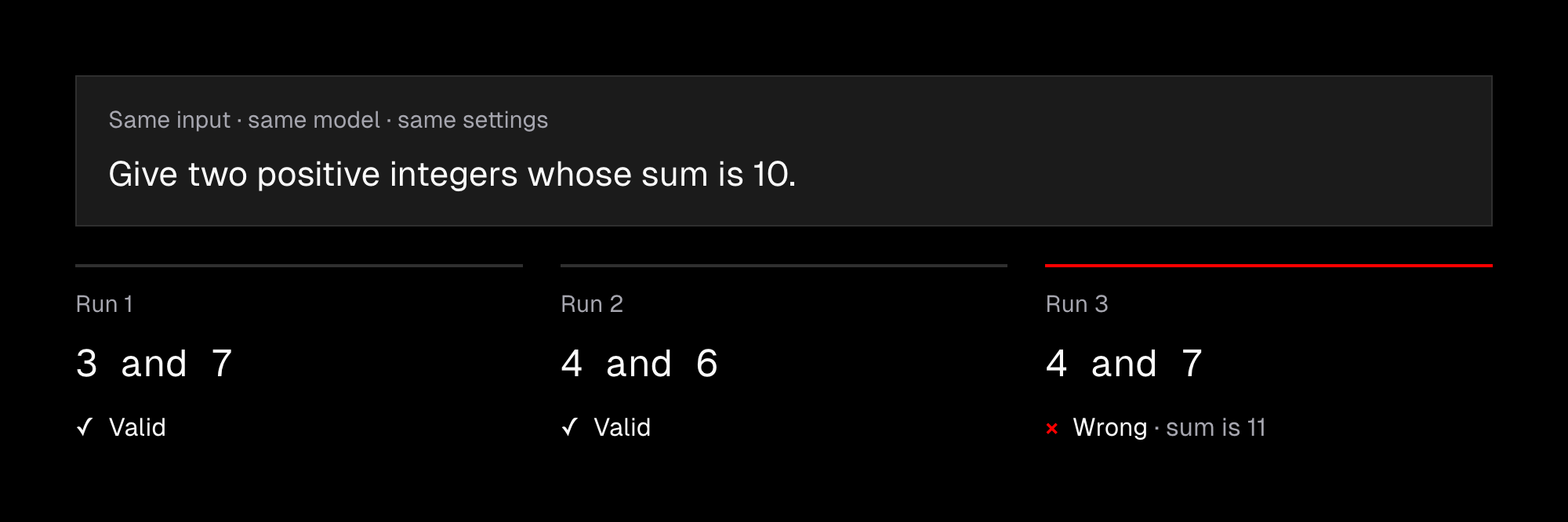
Non-determinism: Even with the same input, LLMs do not always produce the same output. This is not only due to the model and its settings; hardware can also play a role, as discussed in Defeating Nondeterminism in LLM Inference. For us, this means we can never be fully sure of the results produced by a language model, regardless of how the prompt and settings look. This is the exact opposite of what we’ve learned about programming over the years.
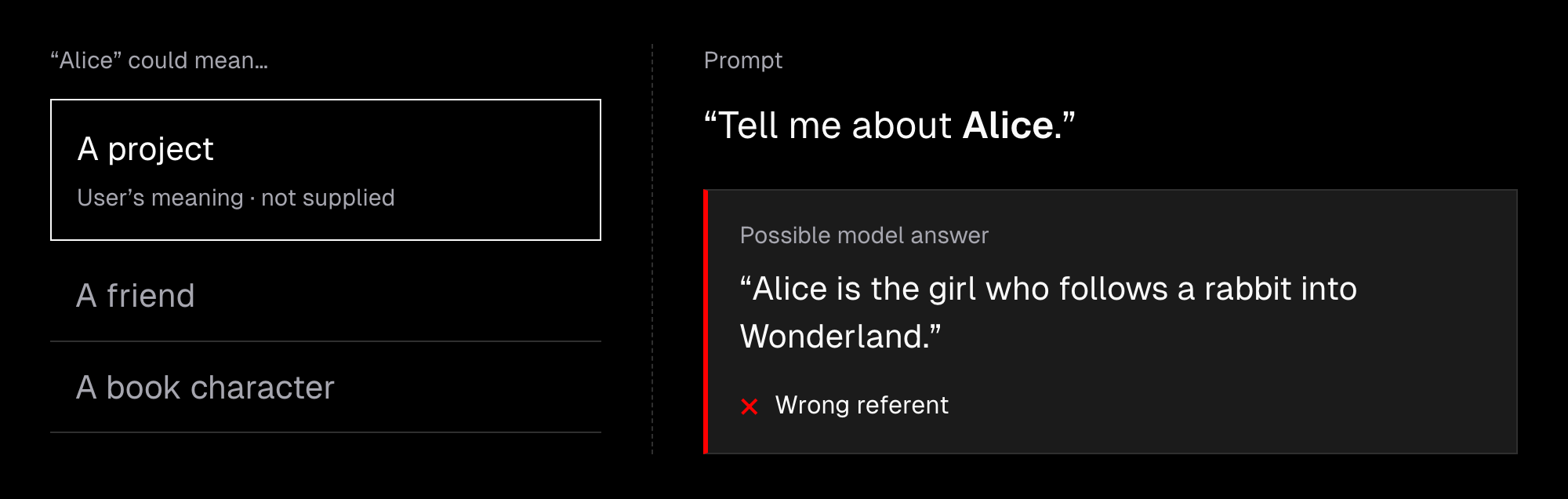
Confabulation (or hallucinations): Generative models are trained on vast but limited datasets and produce results based on probabilities. Their behavior also strongly depends on the available context and the task. As a result, models make mistakes, and working with them is not about certainty but about increasing the chance of getting the results we want. A very good read on this is Why language models hallucinate. It’s worth knowing that we have no solution for eliminating confabulation entirely.
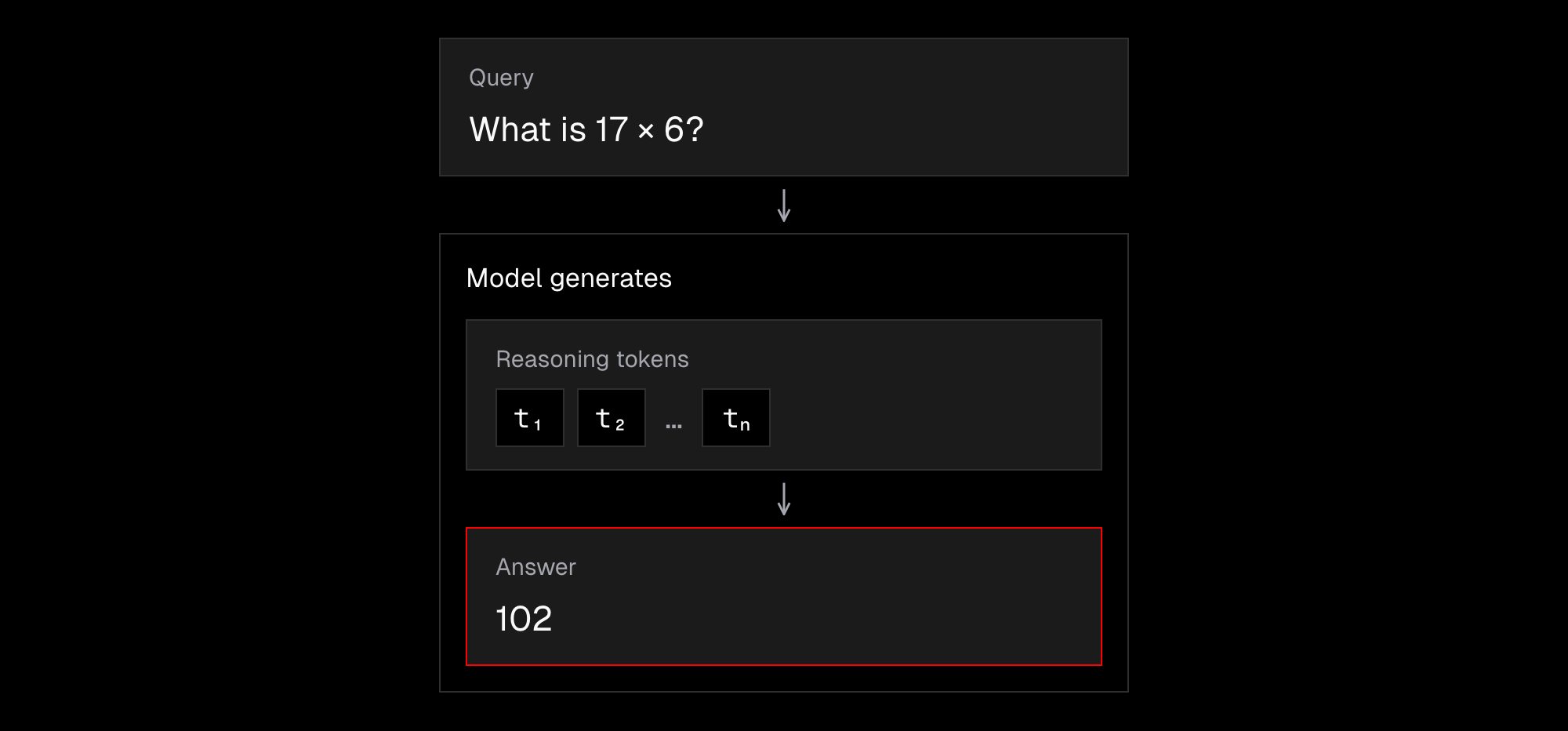
Reasoning: Language models “think” before answering by generating reasoning tokens. We can observe this every day, and it is reflected in the “global workspace” (J-Space) described by Anthropic in “Verbalizable Representations Form a Global Workspace in Language Models.”
More thinking often leads to better results, but it also takes more time and costs more. Reasoning settings vary by provider, and we can often adjust them. However, the right setting depends on the model and the task we want it to handle.
Still, there are some signs that reasoning isn’t quite what we might have expected: models sometimes fail at a task simply because the information is presented in a different order (Premise Order Matters).
We’re not just talking about theory here, but about the foundations of generative AI as we’ve seen it over the past few years. Almost everything here hasn’t changed since ChatGPT’s release in November 2022 and remains useful whether we work with agents, build harnesses or build agents from scratch.
Mechanics of Large Language Models
To take the way we work with agents to the next level, we need a clear understanding of their core mechanics so we can use their strengths and avoid their weaknesses.
Request: Each request to an LLM includes context and settings. The context is often an array of messages that needs to be “completed” with an AI response. The settings include the model and reasoning level, as well as available tools and platform-specific fields. Currently, the most popular format for interacting with an LLM API is the Responses API.
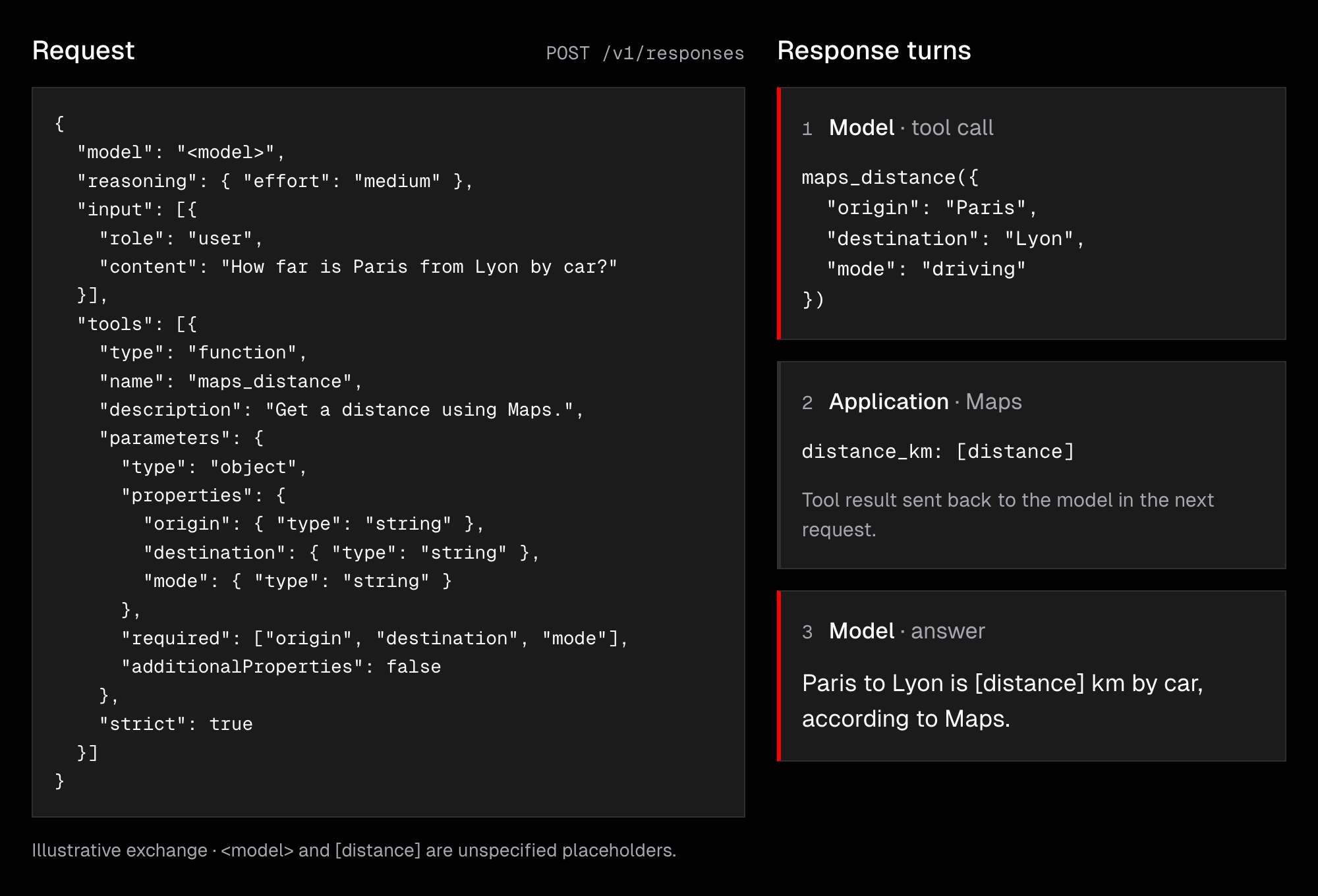
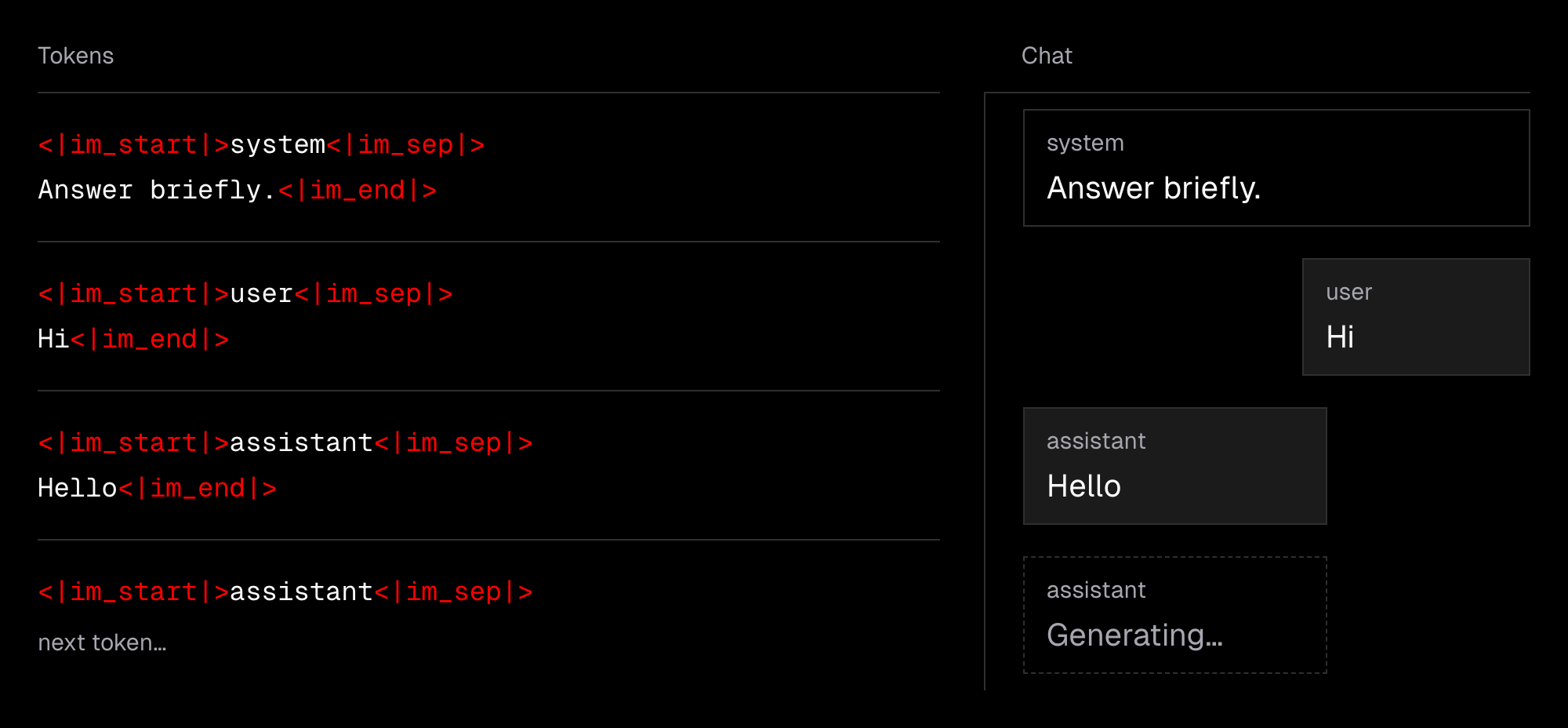
Completion: LLMs generate content by “predicting the next token”, and the fact that we can chat with them is only due to a format called ChatML that structures the processed context using special tokens. You can play with it using Tiktokenizer. Modern LLMs structure their responses using special tokens, so we can easily tell what the user said, what was generated, and which instructions were provided by the developers of the tool we’re using. In other words, from the model’s perspective, chat messages are just plain text.
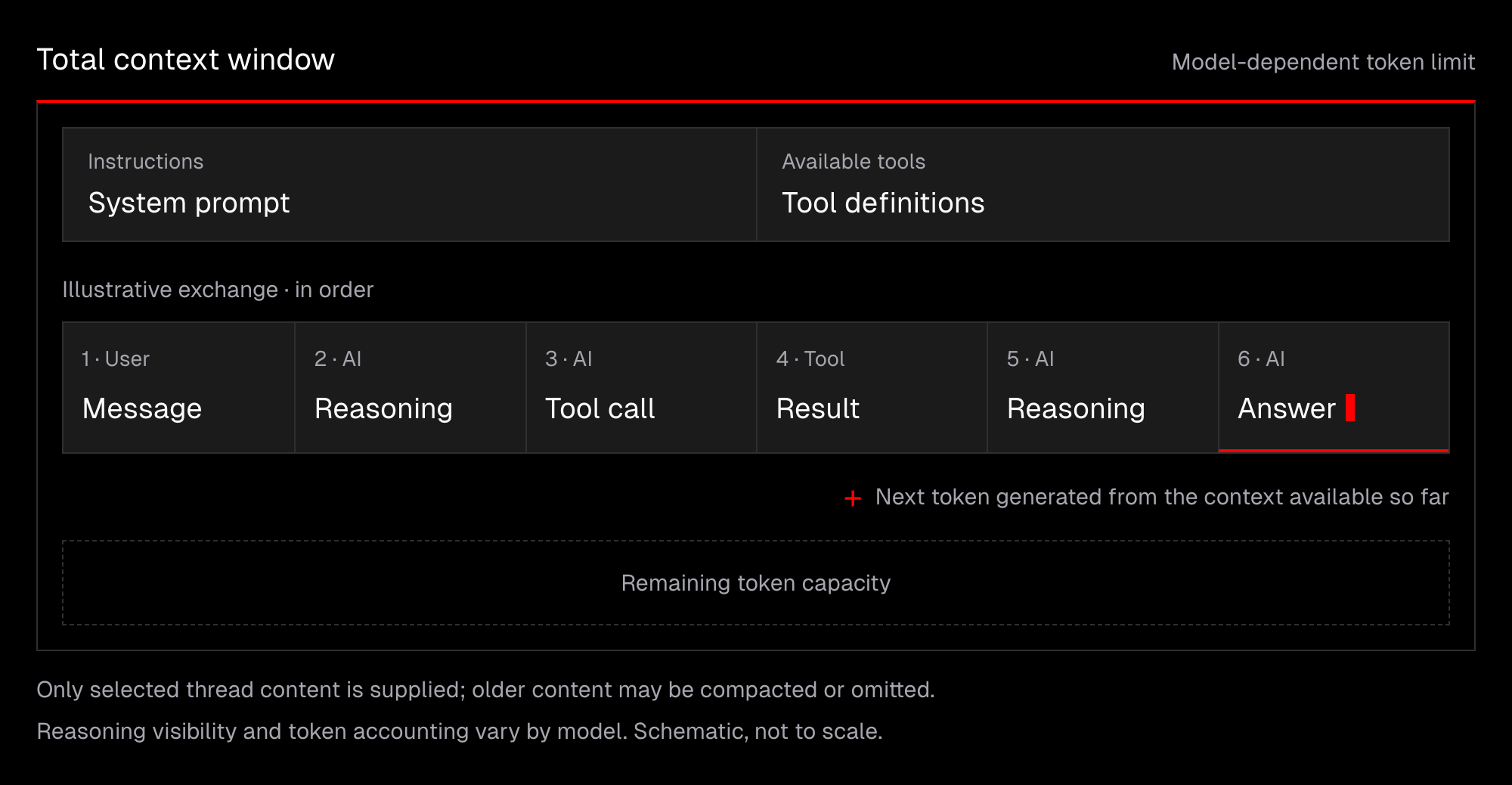
Context Window: LLMs need all the content required to generate a response, but the amount they can handle is limited to roughly 250k–1M tokens, depending on the model. In practice, we rarely hit this limit because tools use various forms of auto-compaction.
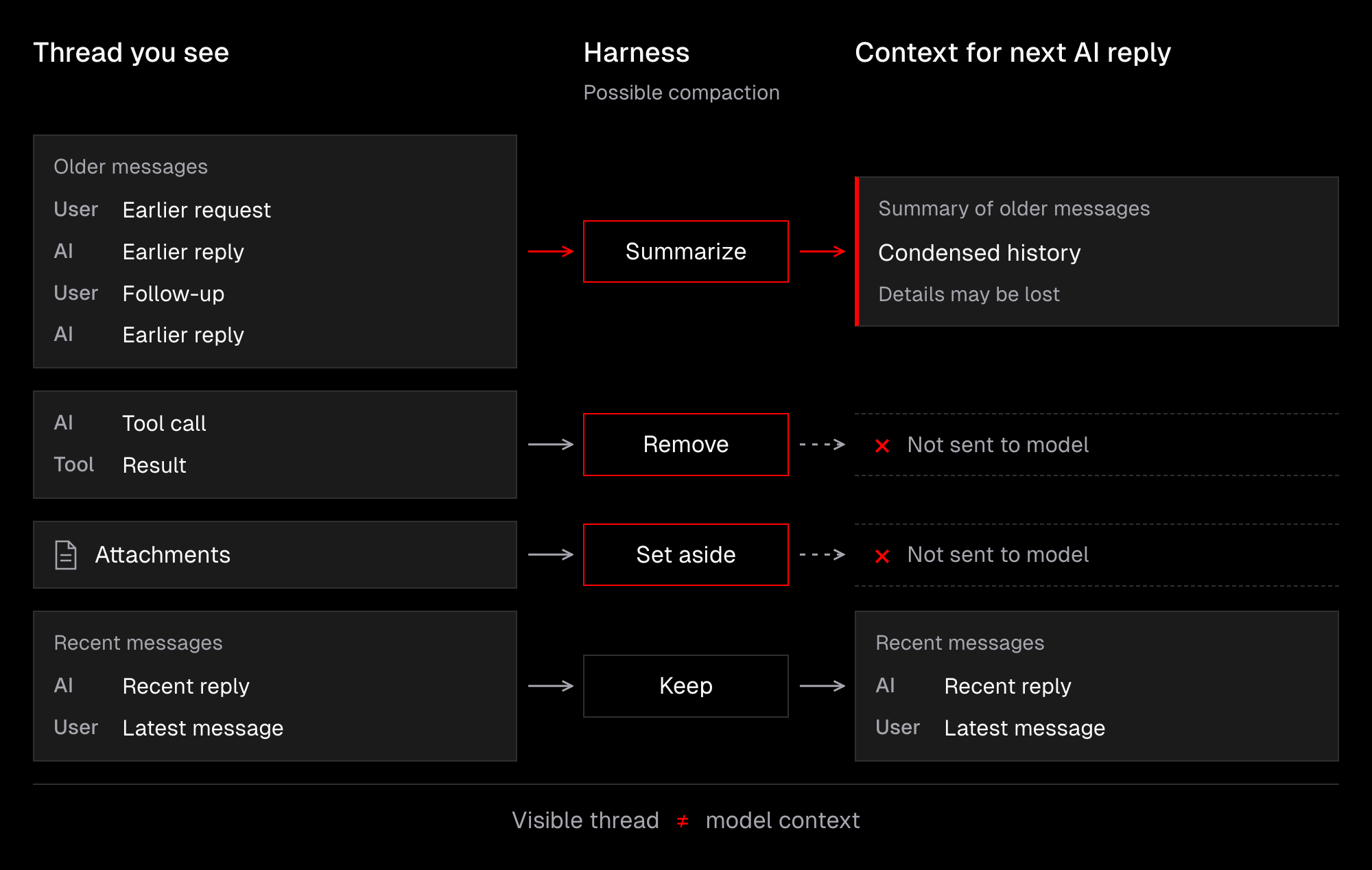
Still, it’s worth remembering that not everything in a thread is passed to the model. At the same time, we know that the model predicts the next token based on the context available so far. This makes longer conversations with agents lossy, as some information gets compressed or trimmed.
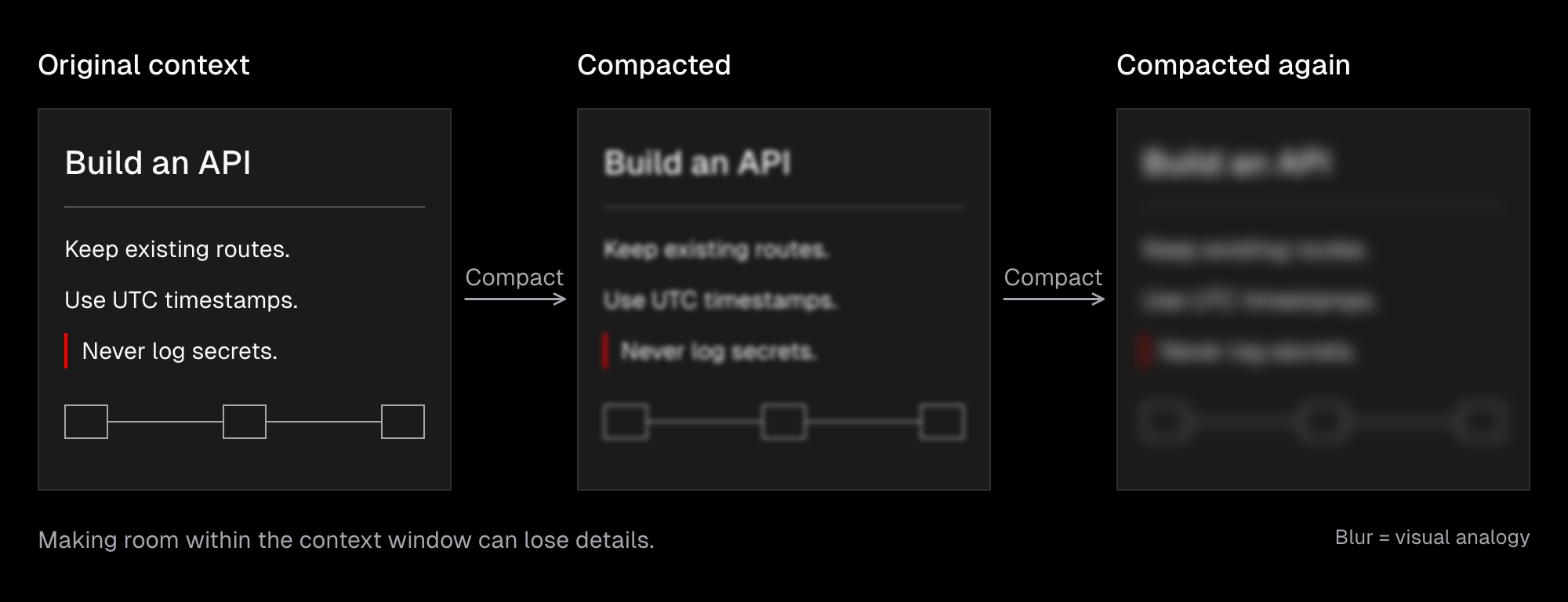
While context compaction keeps getting better over time, we’re still talking about compression, so some data gets lost or gets extracted. Either way, the model loses sight of what was originally in our query, making it less likely that we’ll get the result we asked for.
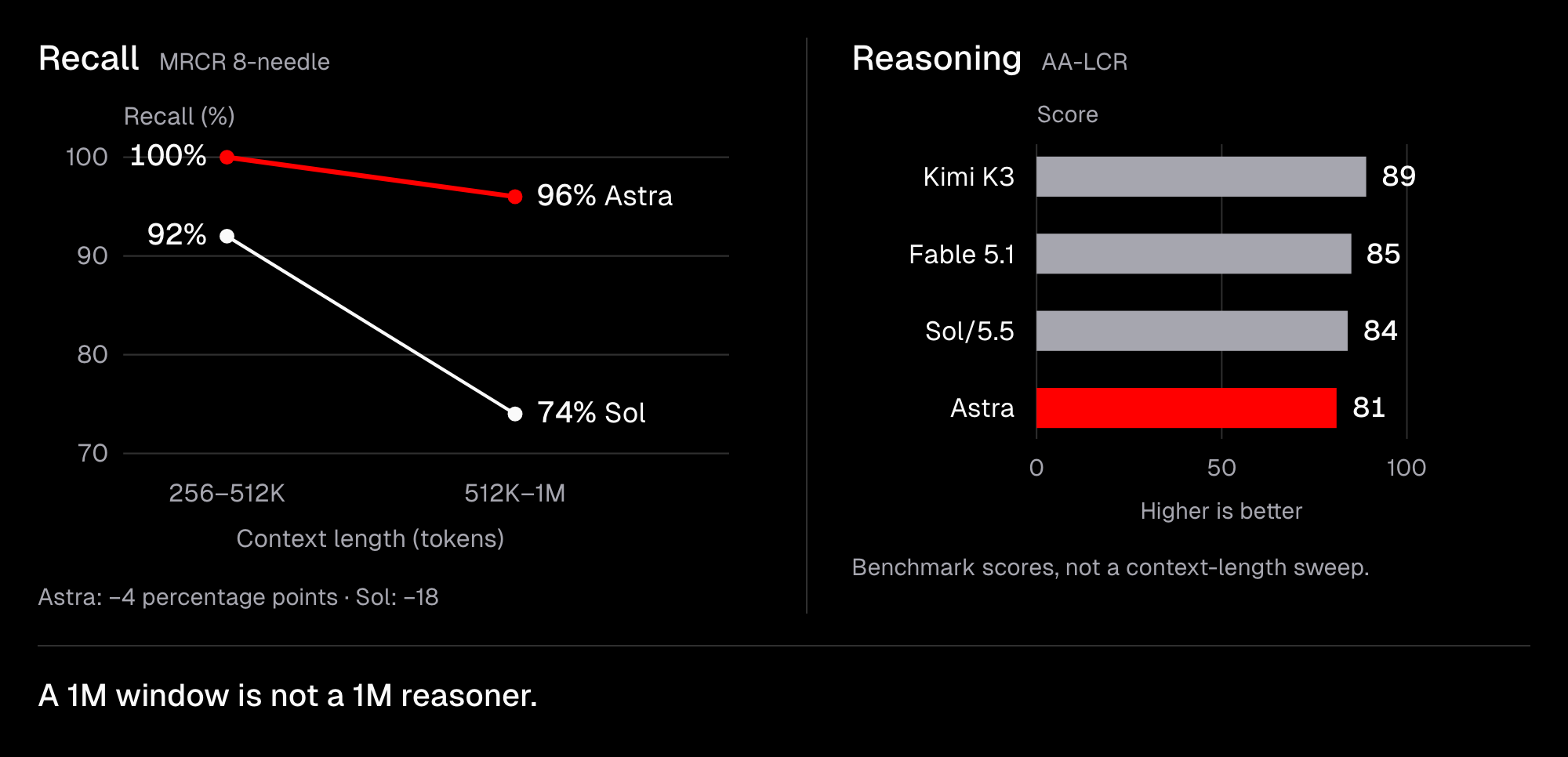
Context Understanding: The fact that an LLM can handle 1M tokens does not mean using that many is a good idea. A model’s reasoning performance still drops with longer contexts, and as a rule of thumb, models perform best when using less than 30–40% of their context limit. For simpler tasks, such as retrieving information from a long text, the latest models perform really well.
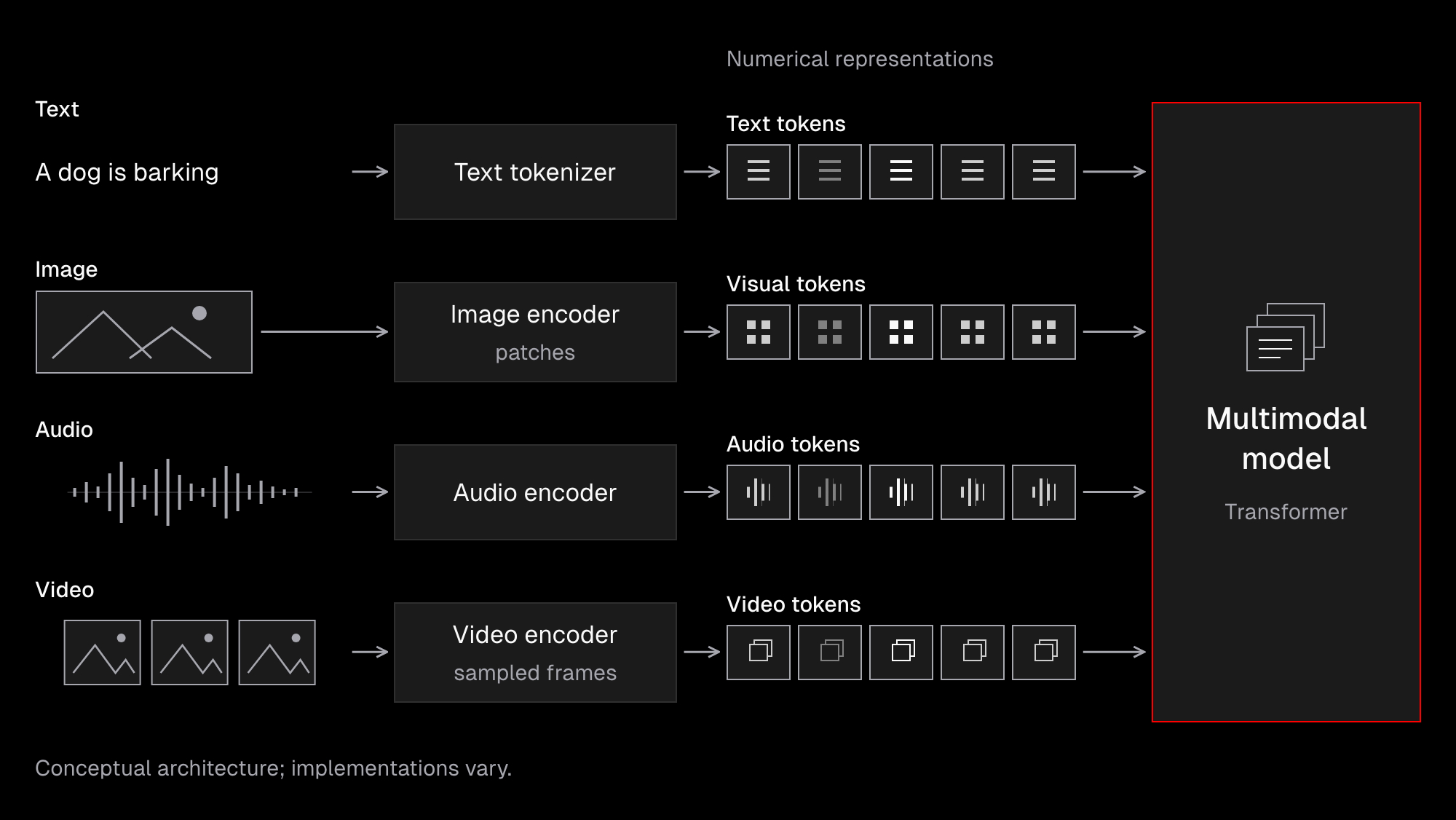
Multimodality: Models have different capabilities, and some of them can process not only text but also images, audio and sometimes even video. To make this possible, data has to be tokenized as well (but in a different way) and then processed by a model. The important part is that models process numbers, not actual information, so they perceive images, audio and even text differently from how we might initially expect.
For example, language models often struggle to understand details such as overlapping elements, exact colors, or measurements.
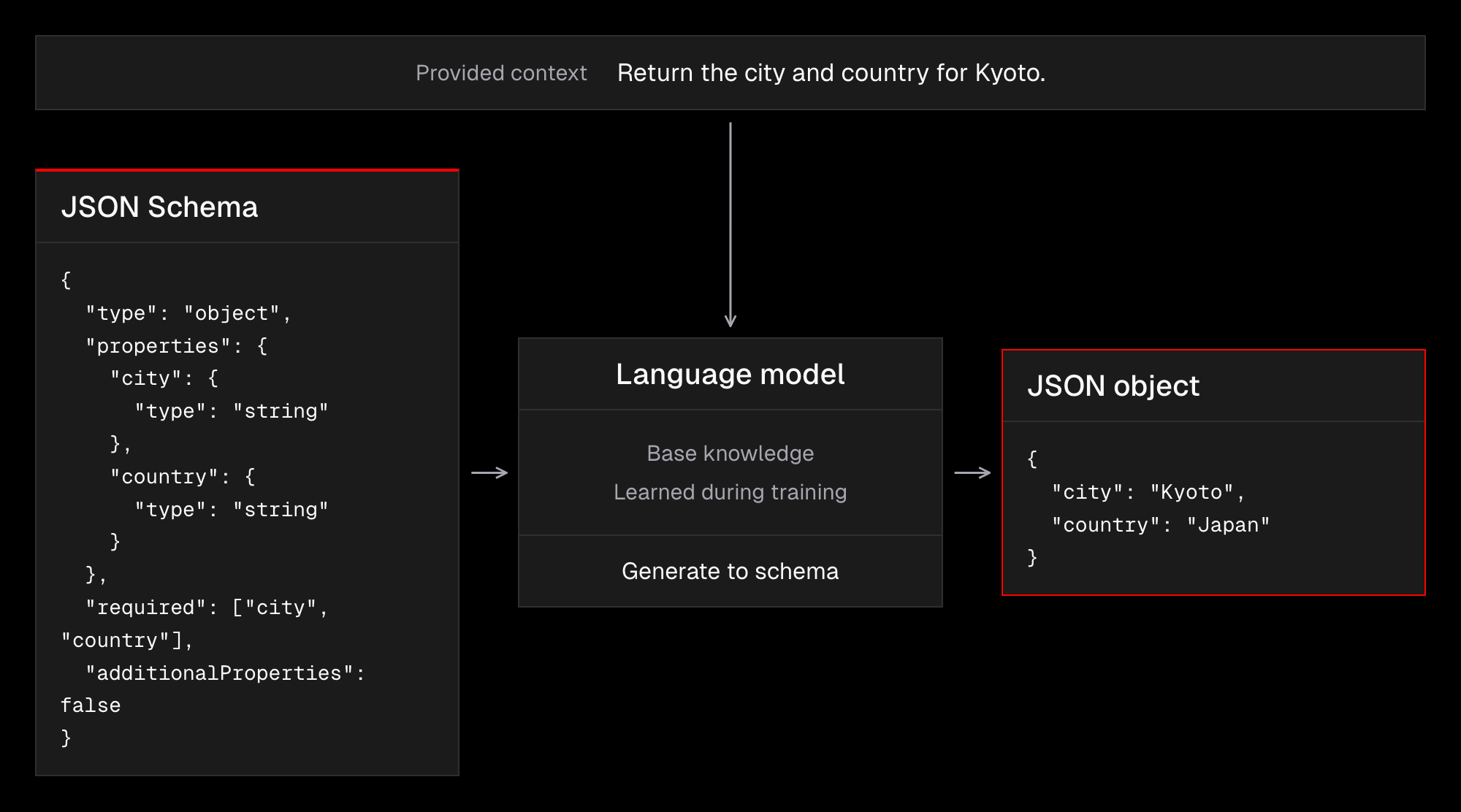
Structured Outputs: A model can generate text and structure it as a JSON string that can be easily processed in code. This way, we can extract information from unstructured documents, and this also allows us to use language models in application logic that often takes the form of agents.
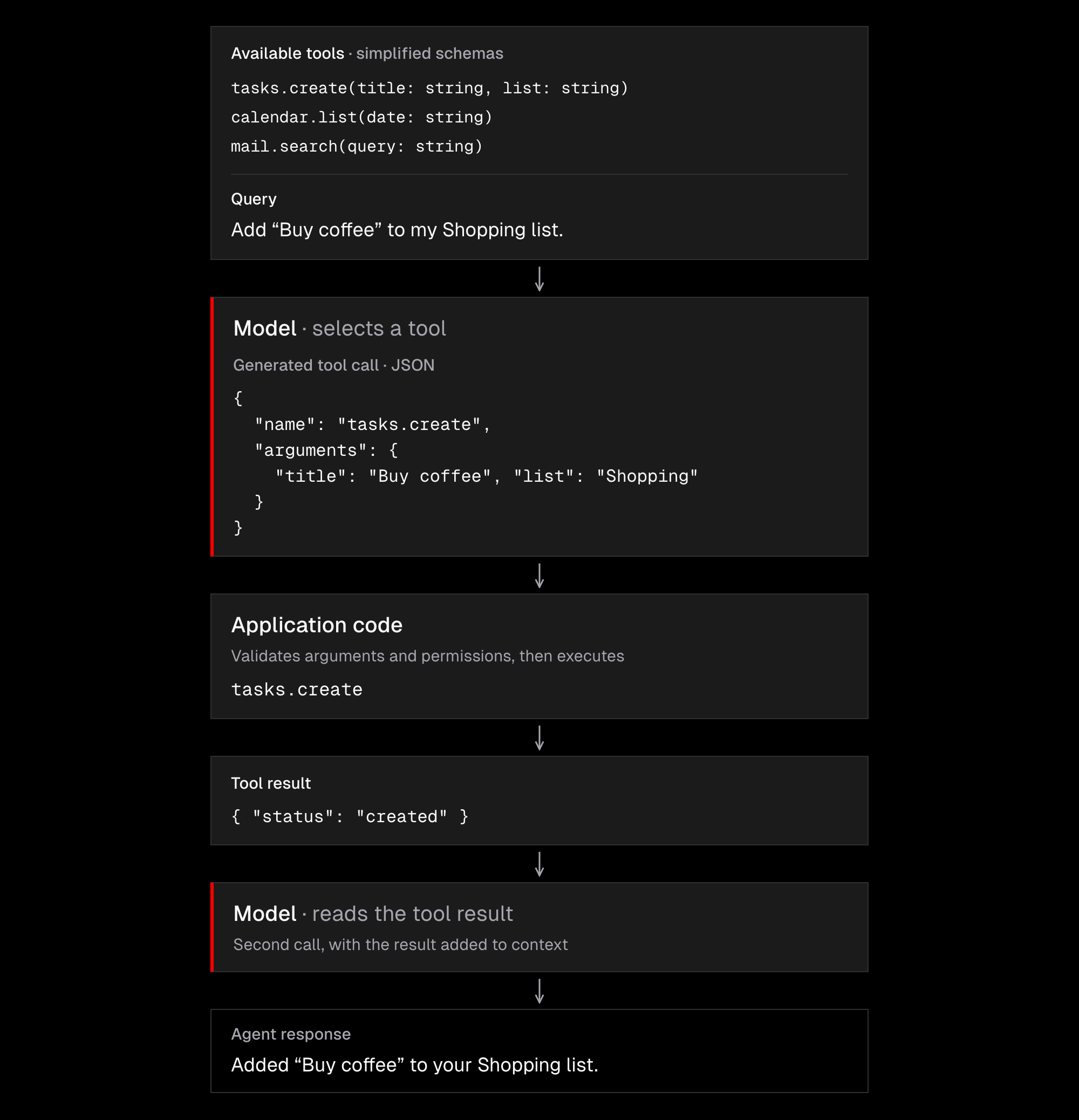
Function Calling: Since models can generate JSON strings, one of the returned fields may be a function name, so they literally point to a tool that needs to be used. This information is handled in code to perform the action with the generated payload and feed the results back to a model.
Code Mode: Function Calling requires all schemas to be present in the context, so the model can decide which tool to use. But we know the context window has its limits, and it’s a waste to include all this information even if the interaction does not need it. At the same time, the latest models have become very good at writing code.
This leads us to a scenario in which a model can be provided with only two tools, such as “search” and “execute”. This is enough for the agents to write code using available capabilities. It’s more efficient than function calling in almost every aspect, but it’s more difficult to deploy to production, since code has to be executed in sandboxes such as Daytona or Cloudflare. For coding agents that live on our computers, it’s often much easier because they run scripts locally.
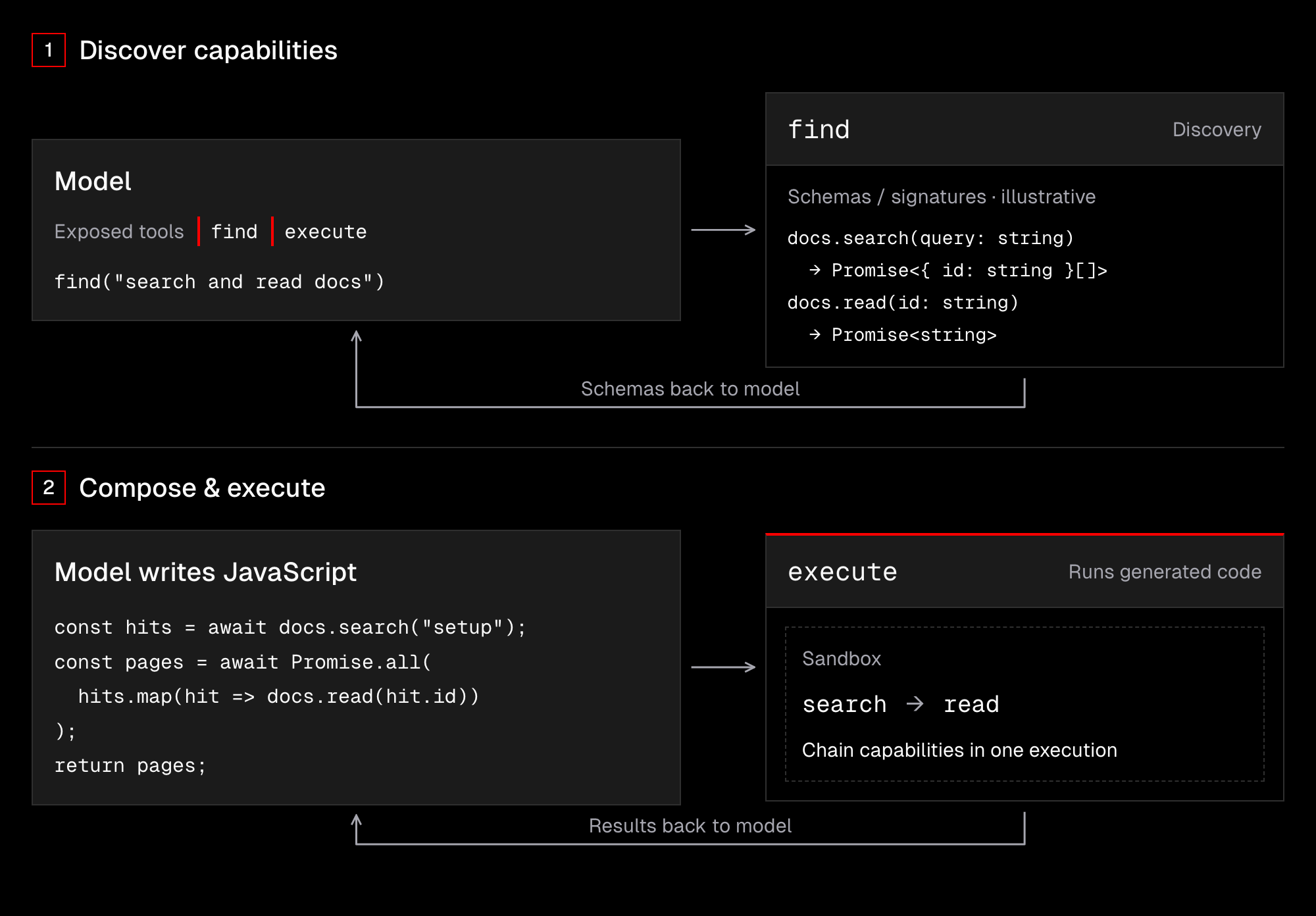
LLMs can’t physically interact with their environment, and there are strict limits on how much information they can process. But they can return structured data that we can use to make API calls. This lets us quickly move our interactions with AI “from answers to actions”, and we’re already seeing this in tools like Claude, Devin, Hermes, and Grok Bot.
Platforms and Harnesses
Most of us will work with AI tools such as Cursor, Claude Code, Omp, Pi, or T3 Code. While each offers some unique features, they all share the same foundation: a language model. The real difference lies in the “package”: roughly speaking, how they use the model’s native strengths and address its weaknesses, and how that ultimately affects UX and overall efficiency.
To make working with AI simple, harnesses often hide the underlying mechanics, so we don’t need to worry about them. The problem is, doing so requires generalization so the solution works for most users.
For example:
- Auto Compaction addresses context window limits, so we can have long threads without errors. Under the hood, there’s often more compression and trimming going on, and this leads us to believe that “our agents know what we are talking about”, while in practice they may see only a small part of what we do.
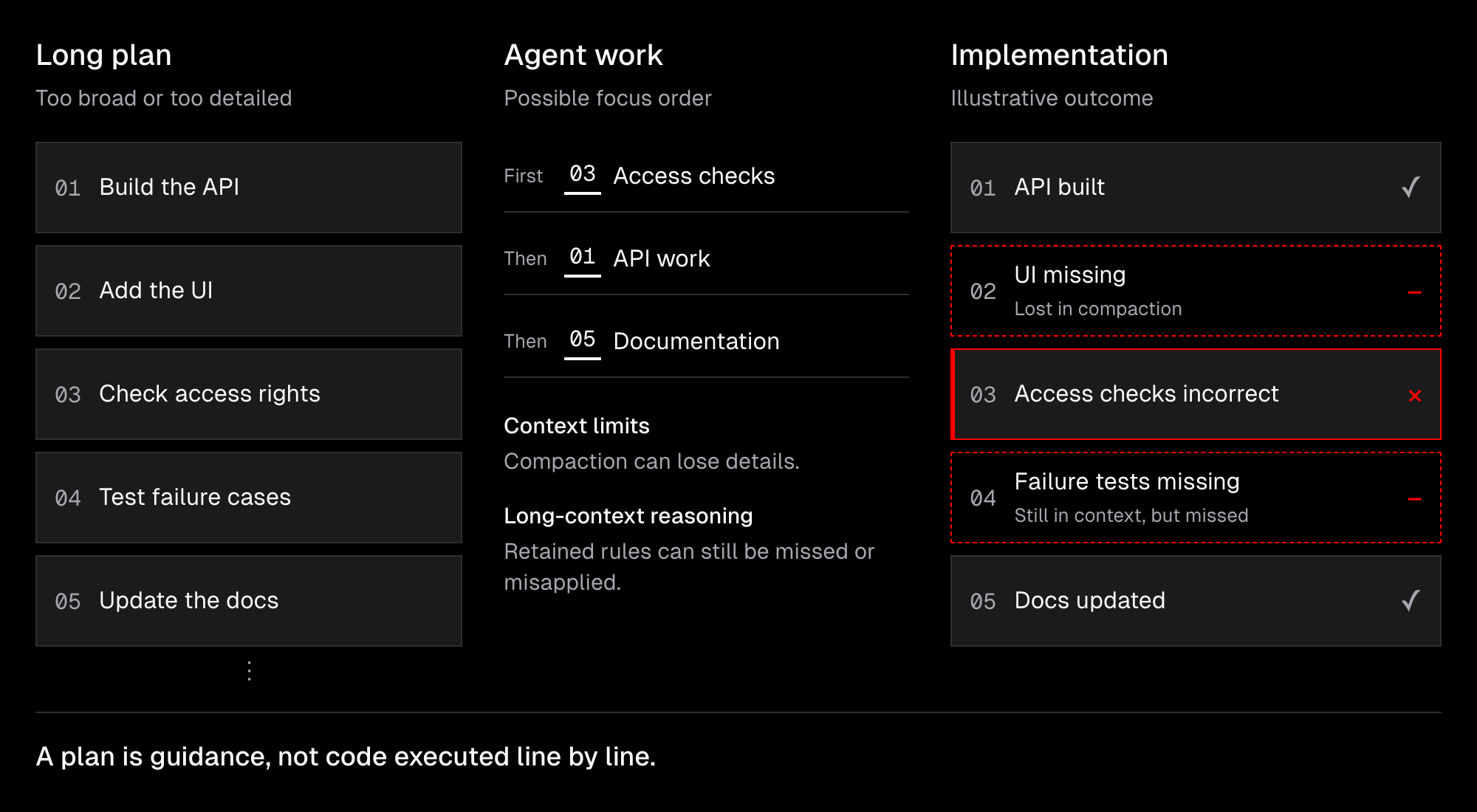
- Plan Mode: Agents often encourage us to plan our work in a dedicated mode focused on adding context and clearly describing the task. This helps unless the plan becomes too broad or too detailed. In either case, models struggle to follow all the rules in a single thread. A better idea is to split the plan into smaller tasks, but coordinating those tasks takes more time unless the agents can manage their own work. We’ll discuss this in the upcoming lessons.
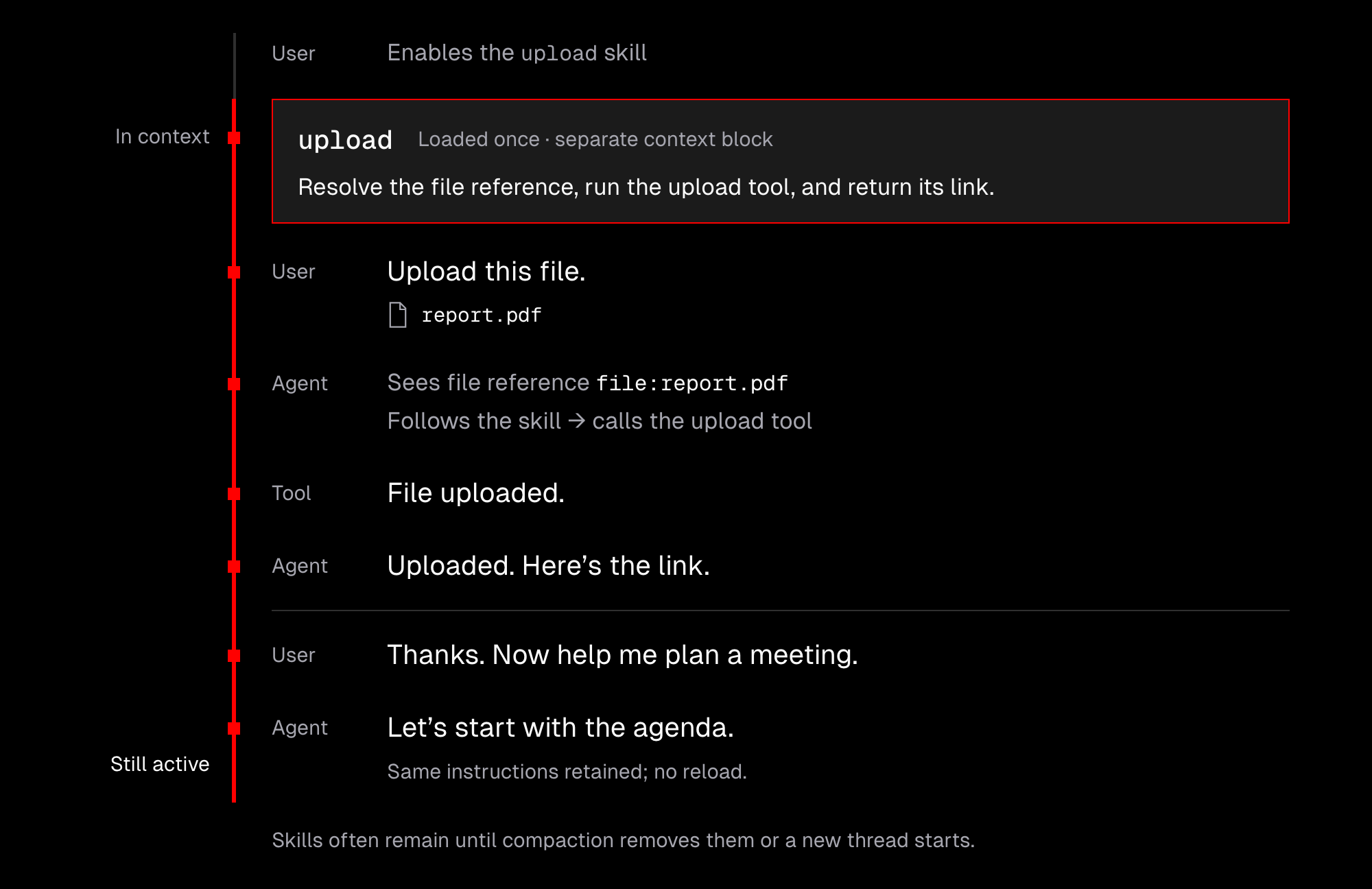
- Skills are files (or folders) with instructions and sometimes scripts, designed to steer a model towards certain behaviors. The thing is, once enabled, they often remain in the context until compaction removes them or we start a new thread. The model can also trigger a skill on its own, but it chooses based only on the skill’s name and description, since skills can’t all be injected into the context at once.
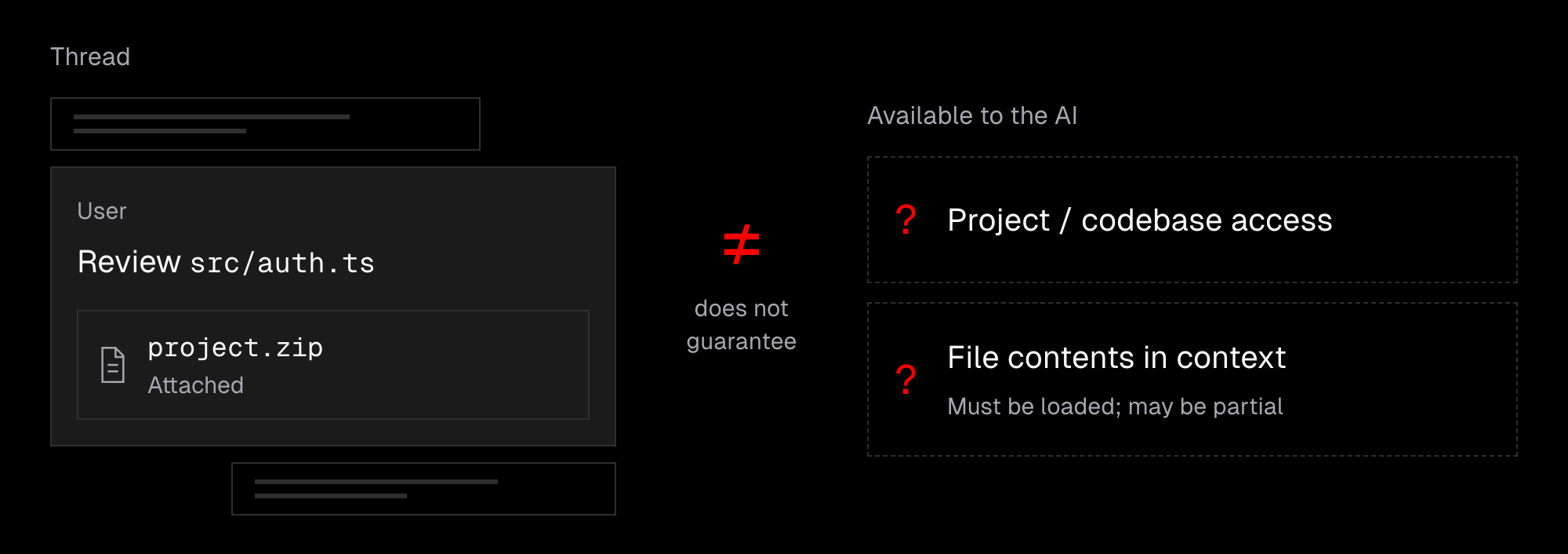
- Attachments like images or any other files, or even references to them, are often presented as if they are entirely visible to a model. But they almost never are. Their content has to be loaded by AI, and sometimes it gets loaded only partially. In other words, even if the UI suggests that some files and folders are visible to the agent, it does not mean they really are. The same applies to the entire codebase or any kind of knowledge base.
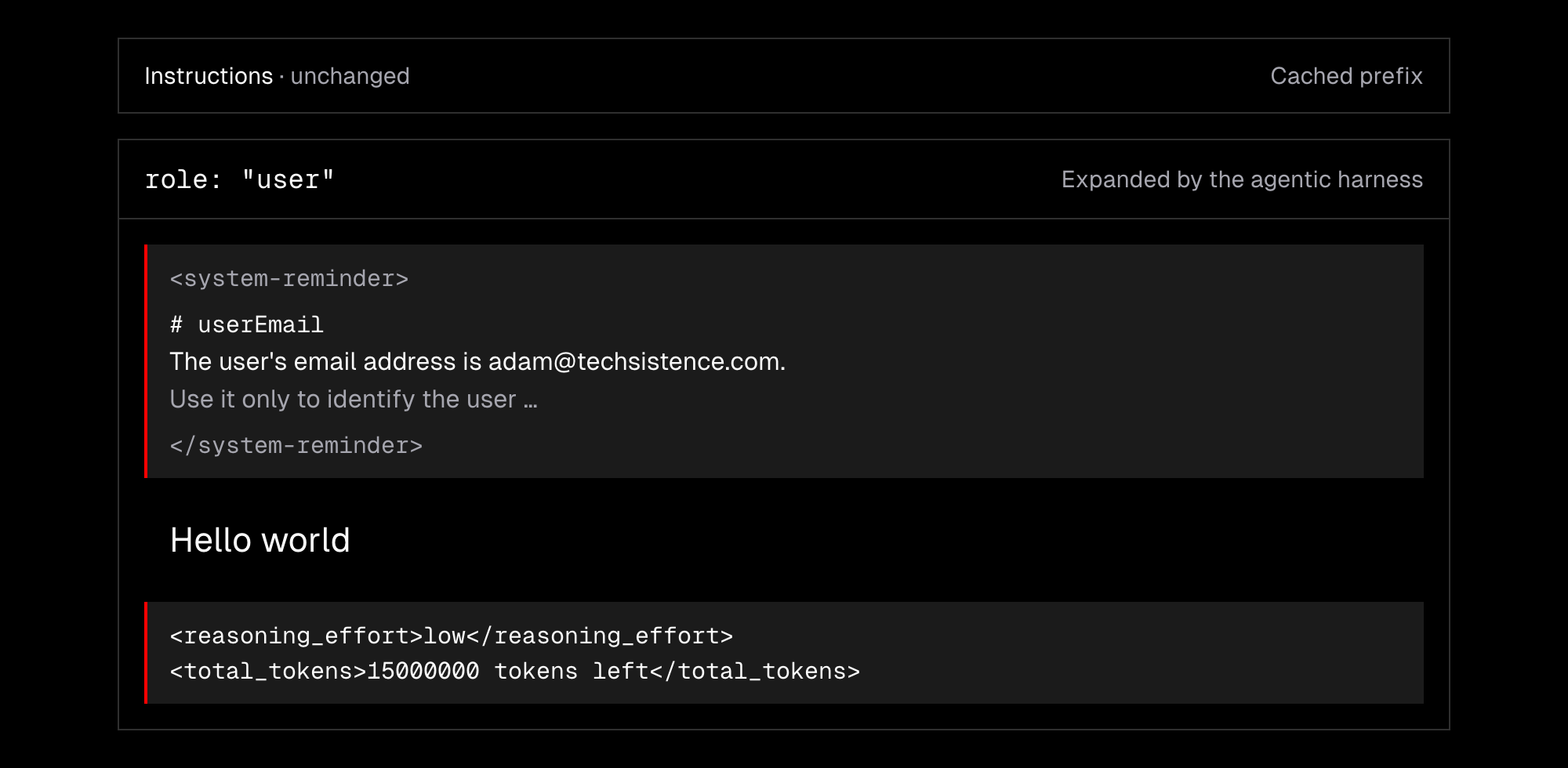
- Environment: Some information can be sent to a model upfront, such as a general profile or some rules. But as we work with agents, the environment changes—files get modified or a Git repository gets updated. The model has to be aware of this, but we can’t modify its instructions due to the caching mechanism, which we’ll discuss later. For now, we need to know that our message is not the only thing models get.
Those examples show us some of the underlying mechanics of the tools we work with every day. Their behavior depends on how LLMs work in general and on the API provider, but it always affects our experience and the results we get from AI. Throughout the course, we’ll explore even more behaviors like these and techniques for using them to our advantage.
Now, let’s take a closer look at popular providers such as OpenAI, Anthropic, xAI, and Gemini, their offerings, and their tooling.
- OpenAI offers GPT models and an almost full range of multimodal capabilities, including image generation and editing, audio understanding and generation, and video generation. ChatGPT is its main product, and OpenAI shaped a popular API format called the Responses API.
- Anthropic offers Claude models and focuses on text generation and image understanding. Its main products are Claude and Claude Code.
- xAI aims to deliver a full range of multimodal capabilities. Its main products are Grok and Grok Bot.
- Gemini offers a full range of multimodal capabilities, including video understanding. It also has its own API format called the Interactions API.
- Bonus: we also have platforms such as OpenRouter, which offer easy access to models from all the major labs and a vast library of open-source models.
Technically, it’s possible to tell which model is best at a given moment (see Artificial Analysis), but that changes frequently, so it’s a good idea to avoid “vendor lock-in”. Especially since we may want to use a different model for a given task to optimize cost and speed, or multiple models for the same task to improve quality.
When working with AI, we’ll almost always want to use the best models available, although there are some tasks we want to automate or run at scale. Then we may want to check if lower settings
To avoid vendor lock-in, we’ll discuss a harness-agnostic setup with tools that aren’t tightly tied to a particular provider. For example, instead of using Codex, we’ll suggest working with Omp / Pi, OpenCode, or tools like T3 Code or Superset.
Generalized Steering
You may have heard of prompting techniques such as chain of thought, few-shot prompting, or tree of thoughts, which were popular before the rise of LRMs (Large Reasoning Models). Then came general instruction files such as AGENTS.md, containing broad rules and personalization details.
Recently, there’s been a common belief not only that we don’t need additional control over the model, but also that it can do more harm than good. While there’s some truth to that, the reality isn’t so simple. We may still want to steer a model, not by giving it precise instructions to follow, but by guiding it toward certain behaviors. For example:
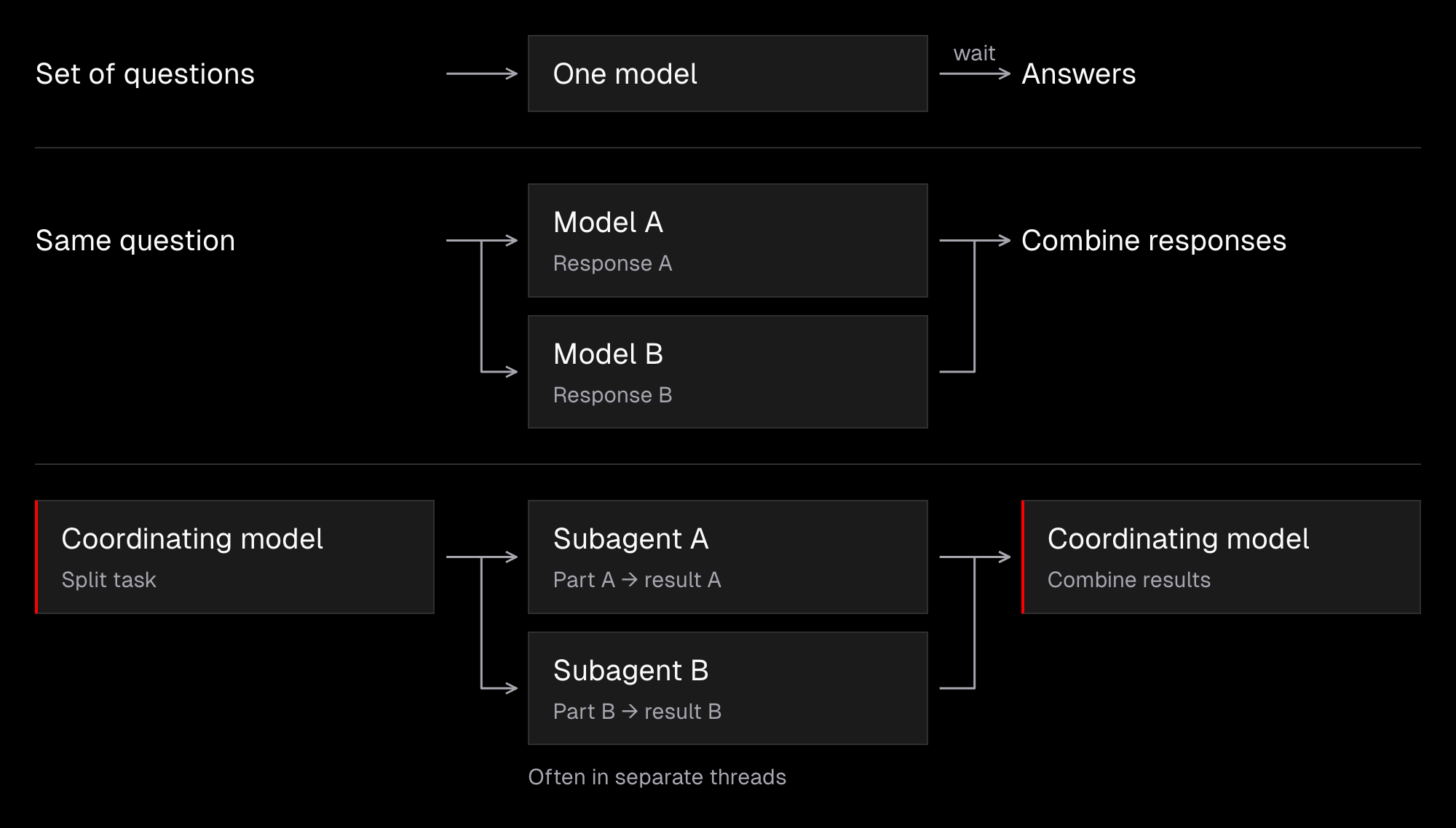
- Different perspectives: We can ask AI a set of questions and wait for the results. We can also ask multiple models the same question and then combine the results. Another option is to ask a model to start multiple subagents (often as separate threads) and delegate different parts of a task to them. This takes advantage of the fact that models “think” by generating tokens, and that whatever precedes a token affects which token is generated next.
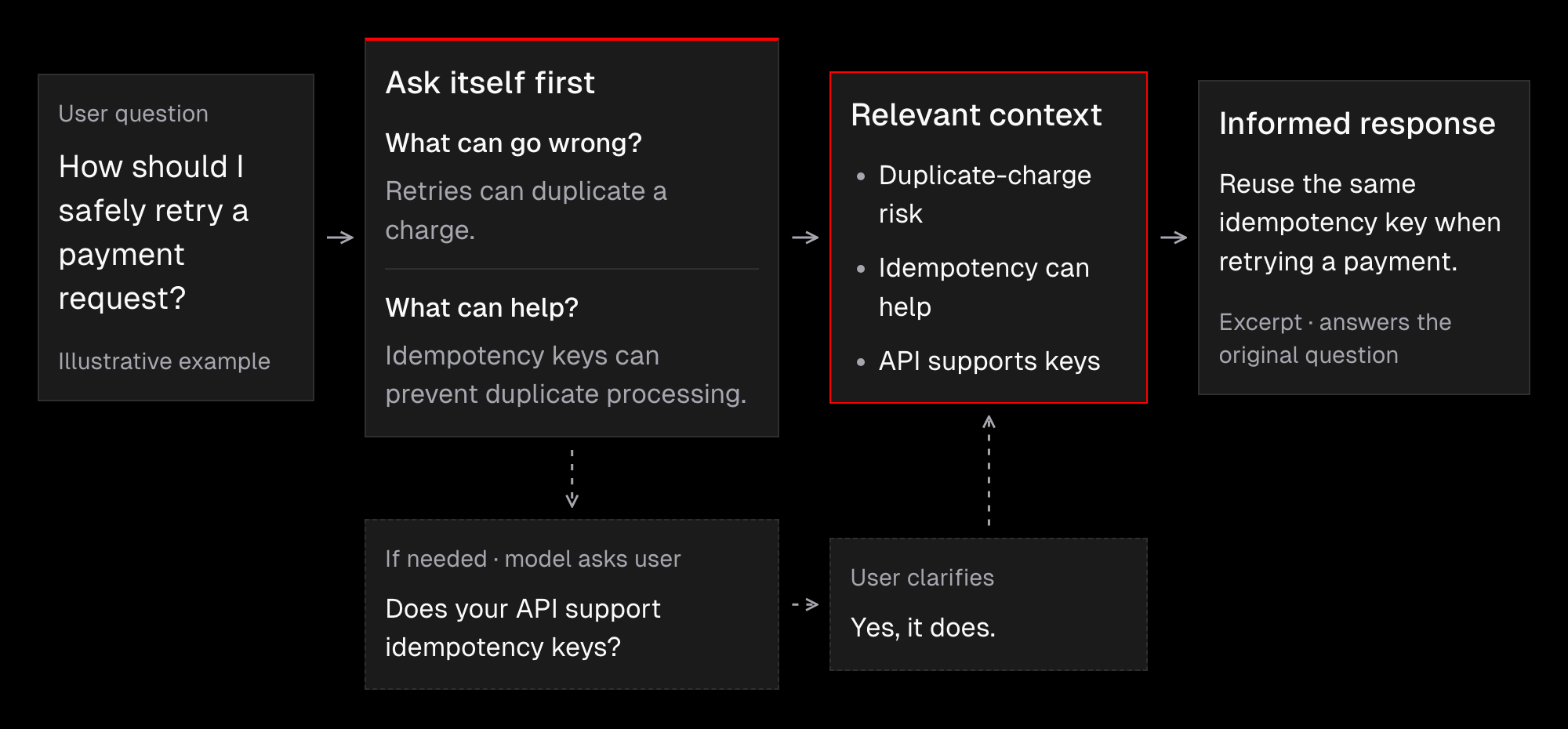
- Self-querying: LLMs hold vast knowledge, but it often stays beyond the reach of the current interaction, namely the “working memory”. We can ask a model a few questions before giving it the actual task. We may also ask a model to ask itself questions and then answer them to widen its own understanding of a topic.
- Memory: Since every thread with an LLM starts from scratch, we can’t expect even the most intelligent model to understand everything about us. Agentic memory remains an open problem, and we’ll discuss various strategies to get the best possible results with it. For now, we just need to keep in mind that we need a way for an agent to access the required information to accomplish the task, even if that information wasn’t included in our original request.

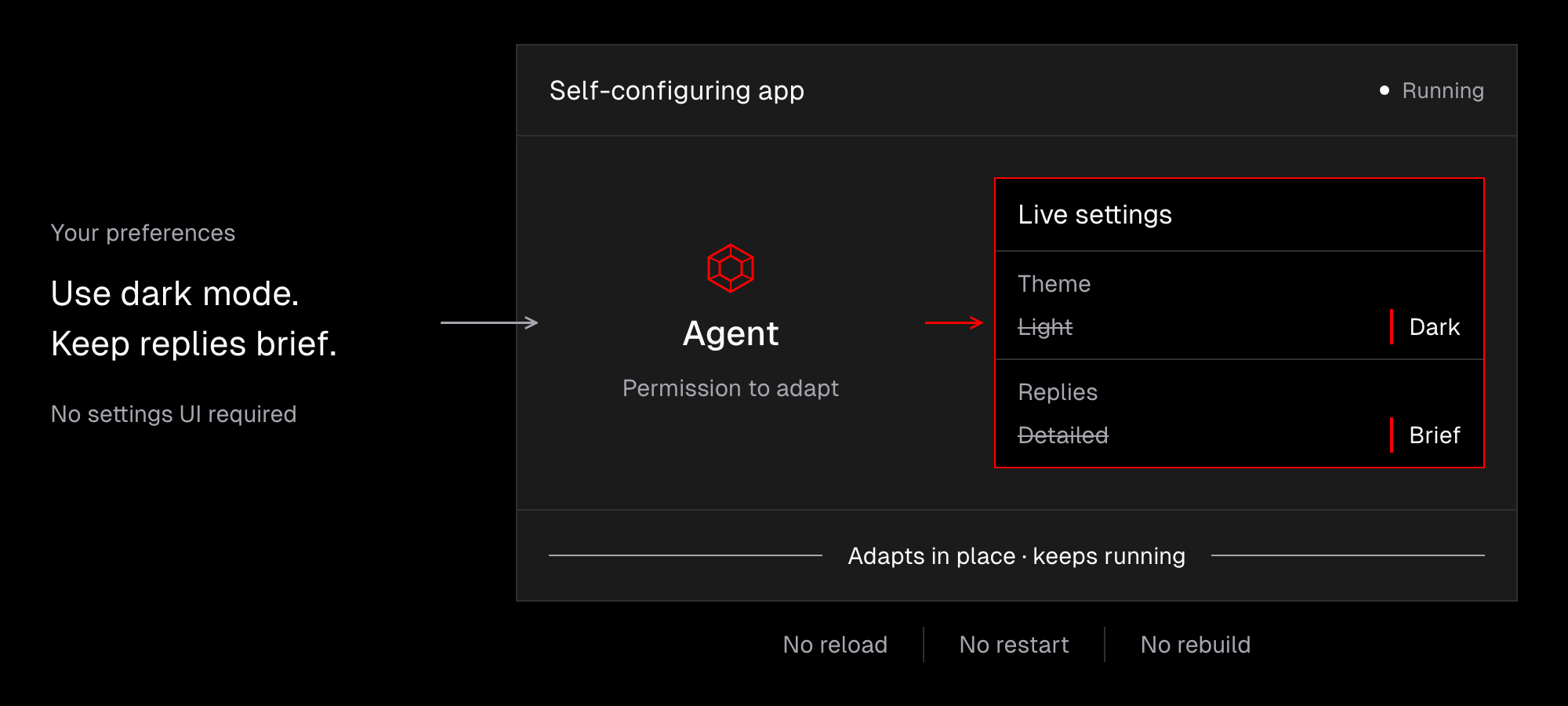
- Self-Management: There are signs that software is heading towards self-configuration or even self-evolution. Good examples are Pi and OpenCode 2, where agents can manage all the settings without having to reload the environment. This paradigm changes both the way we work with agents and the way we create software. In other words, agents have to become first-class citizens in software. And as users, we need to think about how agents can work on our behalf and manage themselves with minimal involvement from us.
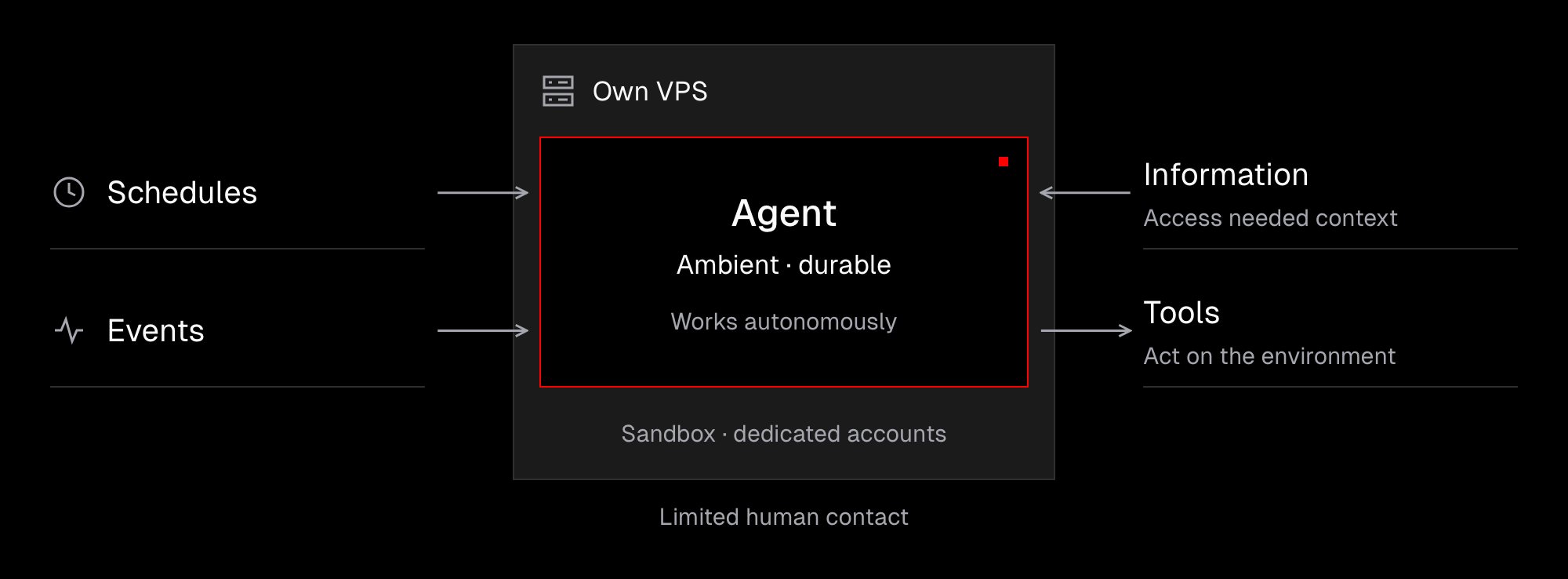
- Ambient, Durable Agents: We’re already familiar with working directly with agents. And while there’s still a lot we can improve about that, we’re quickly moving from local agents to remote agents that run on a schedule and respond to events. These agents are designed primarily to work autonomously, so their contact with humans is limited. We need to give them both a way to access necessary information and tools to interact with their environment safely and reliably. This often involves running agents in sandboxes, on their own VPS or PC, with dedicated accounts.
Takeaway
So far, generative AI has progressed mostly through scaling, not fundamental architectural changes. In other words, it hasn’t changed much at its core. And as with any other technology we’ve encountered in our careers, it’s worth diving into the details to get at least a basic understanding of what’s going on under the hood. This lets us reason from first principles about working with agents or building them and makes it easier to tell what’s just hype and what may hold actual value.